Back to blog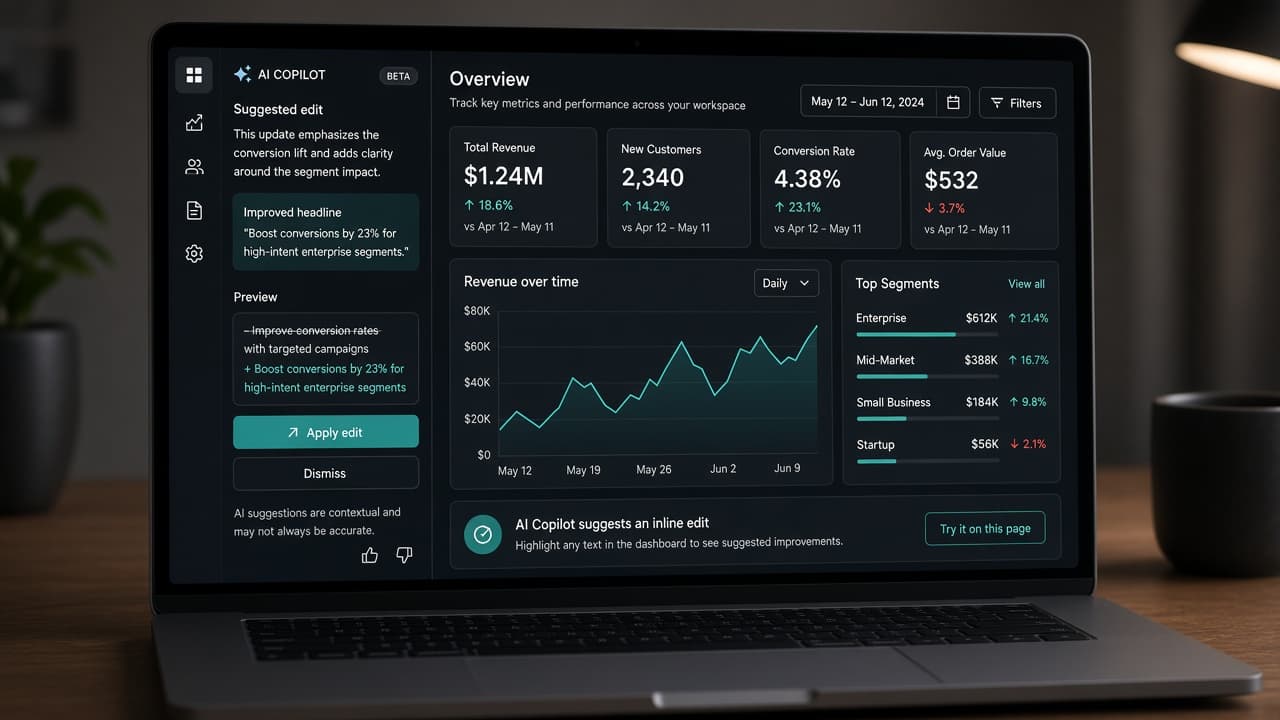
When to use chat widget vs ambient copilot in B2B SaaS

11 min read
Ambient AI Copilots vs Chat Widgets: Which UX Pattern Fits B2B SaaS?
Compare ambient AI copilot UX with floating chat widgets for B2B SaaS: side-panel copilots, in-context AI, invisible UX patterns, anti-patterns, and an MVP implementation checklist.
Ambient AI copilot UX is the B2B default chat widgets promised but rarely deliver
The fastest way to ship AI in 2025 was a floating chat bubble. The fastest way to lose trust in 2026 was keeping it. Buyers wanted leverage inside their workflows—not another window where they re-explain context the product already has.
Ambient AI copilot UX embeds assistance beside the work: a side panel that reads the current record, proposes next steps, drafts in place, and waits for approval before anything leaves the building. The canvas stays visible. Comparison, fine editing, and accountability remain possible. That is the bar for B2B SaaS.
This guide compares chat widget vs copilot patterns, AI copilot side panel design, AI in context SaaS UI, and invisible AI UX where the best interface is no interface until you need judgment. It complements intent-based entry points—command palettes and job-scoped intents get work started; ambient copilots supervise execution without hijacking the screen.
If you published a general chat already, you do not need to rip it out overnight. You need a decision framework: which jobs deserve ambient copilots, which deserve bounded chat, and which should stay plain UI. This article gives that framework plus anti-patterns and an MVP checklist you can run this sprint.
Primary keyword throughout: ambient AI copilot UX—the interaction model where AI is present, contextual, and reviewable without owning the full viewport. Founders shipping B2B SaaS in 2026 should treat this as a product decision with measurable outcomes, not a branding exercise. Prototype the smallest slice that proves the pattern, instrument hesitation and completion, and iterate on copy and placement before expanding scope. Teams that skip this discipline often ship polished demos that fail in week-two retention because the interaction model never matched the job.
Chat widget vs copilot: two models, different trust contracts
Floating chat widgets optimize for availability: ask anything, anytime, anywhere. Side-panel copilots optimize for context: help with this record, this view, this draft. The chat widget vs copilot decision is not aesthetic—it is risk and job shape.
Chat wins when the artifact is language or code and the user expects a transcript—support macros, email replies, SQL drafts. Copilot wins when the user is editing structured data, comparing tables, or approving actions on visible objects.
Chat encourages unbounded prompts. Copilots should expose bounded verbs tied to screen state: summarize this ticket, suggest next status, draft reply from macros— not "what should I do about my business."
Trust differs. Chat errors live in a scrollback users ignore. Copilot errors touch fields users will ship to customers. Copilots need receipts, undo, and evidence panels; chat needs them too but teams forget because the bubble feels casual.
Metrics differ. Chat measures messages sent. Copilots should measure jobs completed with approval, time saved on object pages, and edit rate before accept. Vanity chat engagement hides low value.
For MVPs, pick one object-centric copilot flow before global chat. Global chat is easier to demo and harder to prove. A copilot on the ticket detail page proves value in week one support workflows. Founders shipping B2B SaaS in 2026 should treat this as a product decision with measurable outcomes, not a branding exercise. Prototype the smallest slice that proves the pattern, instrument hesitation and completion, and iterate on copy and placement before expanding scope. Teams that skip this discipline often ship polished demos that fail in week-two retention because the interaction model never matched the job.
| Signal | Prefer chat widget | Prefer ambient copilot |
|---|---|---|
| Primary artifact | Text/code conversation | Records, tables, dashboards |
| Context source | User must paste context | Product already has object state |
| Risk of action | Low—drafts and answers | Medium–high—writes and sends |
| User posture | Exploratory question | Task completion on screen |
| Success metric | Useful reply | Approved outcome on object |
AI copilot side panel design that stays out of the way
AI copilot side panel design succeeds when users forget it is there until they need it—then cannot live without it.
Anchor the panel to object pages, not globally overlaid on every route. Width should preserve canvas readability: typically 360–420px desktop, collapsible to a rail icon. Remember tablet admin users.
Panel anatomy: header with scope ("This ticket"), suggested actions as chips, plan or draft body, evidence links, primary Approve or Insert, secondary Edit, dismiss that persists per user.
Never cover the primary action button on the canvas. If Approve Send lives on the left, do not hide it behind the panel on the right.
Support keyboard: toggle panel, accept suggestion, cycle evidence. Power users in support and ops live on keyboards.
Collapse state matters. Users need full canvas for wide tables. Persist collapse preference locally. Do not reopen aggressively after every navigation.
Side panel is not a chat transcript by default. Lead with structured cards—summary, draft, checklist. Chat input belongs at the bottom for follow-up refinement, not as the only surface.
Mobile: bottom sheet or full-screen review step—not a permanent side panel crushing content. Copilot on mobile is often review-only; drafting stays desktop for many B2B tools—that is acceptable if honest. Founders shipping B2B SaaS in 2026 should treat this as a product decision with measurable outcomes, not a branding exercise. Prototype the smallest slice that proves the pattern, instrument hesitation and completion, and iterate on copy and placement before expanding scope. Teams that skip this discipline often ship polished demos that fail in week-two retention because the interaction model never matched the job.
AI in context SaaS UI: read the screen, do not rewrite it
AI in context SaaS UI means the model receives structured state—IDs, fields, permissions, recent events—not a screenshot alone. Context reduces hallucination and re-typing.
Pass object JSON server-side where possible. Client-side DOM scraping is brittle. Include role and policy flags so the copilot refuses unavailable actions before proposing them.
Reflect context in UI copy: "Based on ticket #4412 and your macros" beats "I can help." Specificity builds trust.
Suggestions should map to fields users see. Highlight target fields when inserting draft text. Let users apply partial inserts—subject only, body only—instead of all-or-nothing replacements.
When context is stale—user edited fields while copilot ran—show diff and ask to refresh plan. Silent overwrite is how support sends wrong replies.
Multi-record context is advanced. For v1, bind copilot to one primary object. Offering to act across fifty selected rows without a review table is an agent problem, not a copilot v1 problem.
Log context version in receipts for debugging: which object snapshot produced a suggestion. Support teams will ask.
Pair in-context copilots with intent entry on command palette: palette starts job, copilot supervises on the landing page. That split avoids duplicating the intent-based UX post—you are extending it, not replacing it. Founders shipping B2B SaaS in 2026 should treat this as a product decision with measurable outcomes, not a branding exercise. Prototype the smallest slice that proves the pattern, instrument hesitation and completion, and iterate on copy and placement before expanding scope. Teams that skip this discipline often ship polished demos that fail in week-two retention because the interaction model never matched the job.
Invisible AI UX and when zero chrome is correct
Invisible AI UX puts intelligence in defaults, validations, and ranking—not in a visible assistant. Not every feature needs a panel.
Examples: prioritized queue sorting, anomaly highlights, autofilled categories, suggested assignee with one-click accept inline. No side panel, no chat—just better defaults with undo.
Use invisible patterns when confidence is high and blast radius is low. Never use invisibility for sends, deletes, billing changes, or permission updates.
Offer disclosure on hover or "Why this suggestion?" links. Invisible is not secret. Users should opt out or pin rules.
Combine invisible ranking with visible approval for consequential steps—smart sort plus draft reply awaiting insert.
Founders over-index on visible AI because demos need something to point at. Production value often lives in invisible time saved. Measure both: panel-assisted jobs and silent automations accepted.
Marketing should not promise magic chat if the product ships invisible UX—set expectations on the landing page with the same vocabulary sales uses in demos.
When invisible and copilot coexist, document which feature uses which pattern. Internal confusion becomes external inconsistency fast. Founders shipping B2B SaaS in 2026 should treat this as a product decision with measurable outcomes, not a branding exercise. Prototype the smallest slice that proves the pattern, instrument hesitation and completion, and iterate on copy and placement before expanding scope. Teams that skip this discipline often ship polished demos that fail in week-two retention because the interaction model never matched the job.
Anti-patterns that kill copilot adoption in B2B SaaS
Avoid these failure modes seen across 2025 chat launches retitled as copilots in 2026.
Global chat on every page with no object binding. Users paste context once, then rage quit.
Auto-run writes from copilot suggestions without review. One bad send trains disable forever.
Panel that blocks primary navigation or covers modals incorrectly on z-index.
Transcript-only UI with no structured plan or receipt. Compliance asks what happened; scrollback is not an audit log.
Copilot tone that mimics consumer buddy chat in serious ops tools. Professional, concise copy wins.
Feature parity fantasy: copilot that claims it can do anything marketing promised. Bounded verbs beat broken promises.
No offline/error state when model unavailable. Silent failure erodes trust; show degraded mode with manual path.
Separate AI settings universe disconnected from admin roles. Copilot permissions must match product permissions.
Dark pattern copilot upsells blocking workflow. Assistance is not hostage-taking.
Measure disable rate and hide rate on the panel. If above low single digits, fix patterns before adding tools. Founders shipping B2B SaaS in 2026 should treat this as a product decision with measurable outcomes, not a branding exercise. Prototype the smallest slice that proves the pattern, instrument hesitation and completion, and iterate on copy and placement before expanding scope. Teams that skip this discipline often ship polished demos that fail in week-two retention because the interaction model never matched the job.
MVP implementation checklist for ambient copilots
Ship a trustworthy copilot slice in one sprint—not a platform.
Day 1: Pick one object page and one job—draft reply, summarize thread, suggest next step. Write non-goals: no send, no bulk, no cross-object.
Day 2: Prototype side panel anatomy with structured cards, not chat-first. Include evidence placeholders.
Day 3: Engineering wires structured context payload and server-side policy checks. Client renders suggestions; server validates inserts.
Day 4: Add Approve/Insert, partial apply, undo for field writes. Log receipt with object ID and snapshot version.
Day 5: Instrument show panel, suggestion generated, accepted, edited, rejected, undone. Define success thresholds.
Day 6–7: Test five users in role. Watch hesitation at approval. Fix copy and field targeting before expanding routes.
Defer global chat widget unless exploratory Q&A is core value. If you keep chat, demote it to help/docs routes while copilot owns object pages.
Align with agentic UX if you add multi-step runs later: copilot becomes the review surface for plans and receipts, not a separate trust model.
Design partners should deliver panel component specs reusable across objects—headers, chips, evidence lists—so squad two does not fork UI. Founders shipping B2B SaaS in 2026 should treat this as a product decision with measurable outcomes, not a branding exercise. Prototype the smallest slice that proves the pattern, instrument hesitation and completion, and iterate on copy and placement before expanding scope. Teams that skip this discipline often ship polished demos that fail in week-two retention because the interaction model never matched the job.
Choose the pattern that matches job, risk, and screen
Ambient AI copilot UX is not morally superior to every chat widget. It is superior for most B2B object workflows where context, comparison, and approval matter.
Use chat where conversation is the work. Use copilots where the record is the work. Use invisible AI where low-risk defaults save time. Use intent entry where users know the job name before they know the navigation path.
Complement your existing intent-based UX investment: palettes start jobs; copilots assist on the destination screen; agents later orchestrate multi-step runs with the same approval primitives.
Founders should decide pattern in the brief before engineers integrate a vendor bubble. The integration cost is similar; the trust outcome is not.
If you are planning AI for an upcoming release, scope one ambient copilot flow on your highest-frequency object page. Prove completion rate and approval trust. Then expand—or keep chat where it truly fits.
That discipline keeps you out of the 2025 graveyard of ignored chat widgets and inside products that feel professionally augmented, not casually chatty.
Related articles
11 min read
Design Systems for AI Features: Primitives, Review States, and Shipping Velocity
AI features ship faster when design systems define the review contract first—primitives, tokens, and states—not when every squad invents its own sparkle button.
11 min read
Answer Engine Optimization for SaaS: Get Your Product Cited in AI Answers
SEO still matters—but buyers now ask AI assistants first. AEO is how you get your SaaS cited in those answers with pages models can quote accurately.