Back to blog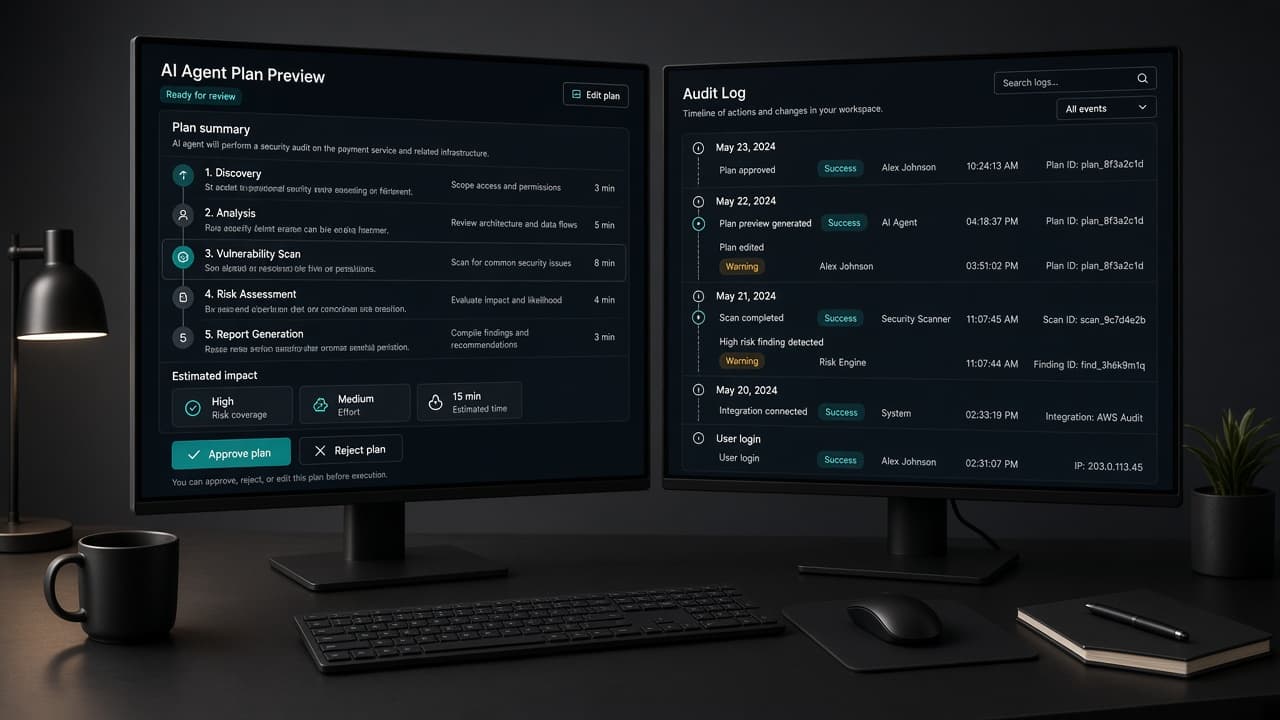
Approval gates by risk for SaaS agent actions
11 min read
Agentic AI UX for SaaS: Design Approvals, Undo, and Trust Before Autonomy
A practical agentic AI UX guide for SaaS teams: approval workflows, human-in-the-loop design, undo and audit logs, and trust patterns that keep agents useful without losing control.
Agentic AI UX is the new product design problem
Search demand for agentic systems has overtaken older “chatbot” language in 2026. Buyers are no longer asking only whether your SaaS has AI. They are asking whether an agent can plan, use tools, and finish work—and whether a human can still steer it. That shift is why agentic AI UX is now a product design problem, not a model-selection footnote.
Agentic products can draft outreach, update CRM records, open pull requests, rebook meetings, and change production settings. Capability without control creates fear. Capgemini and other industry surveys through 2025–2026 show confidence in fully autonomous agents dropping even as experimentation rises. Users want leverage. They do not want silent side effects.
This guide is for SaaS founders, product designers, and design partners shipping agent features into real workflows. It covers agentic AI design patterns for SaaS that you can prototype this sprint: an AI agent approval workflow, human in the loop UX design, undo, receipts, and an AI agent undo and audit log UX that makes actions reviewable. It complements—not replaces—intent-based entry points. Intent gets the job started. Agentic UX decides how far the system may go without you.
If your team is still debating which foundation model to pick, pause. Model quality changes monthly. The interaction contract—what the agent proposes, what requires approval, what can be undone—is the durable product surface. Design that contract first.
SEO note for this article’s focus: the primary keyword is agentic AI UX. Throughout, we also cover the supporting intents teams actually search—AI agent approval workflow, human in the loop UX design, agentic AI design patterns for SaaS, and AI agent undo and audit log UX—because those long-tails convert better than vague “AI chatbot design” queries.
What agentic AI UX is—and what it is not
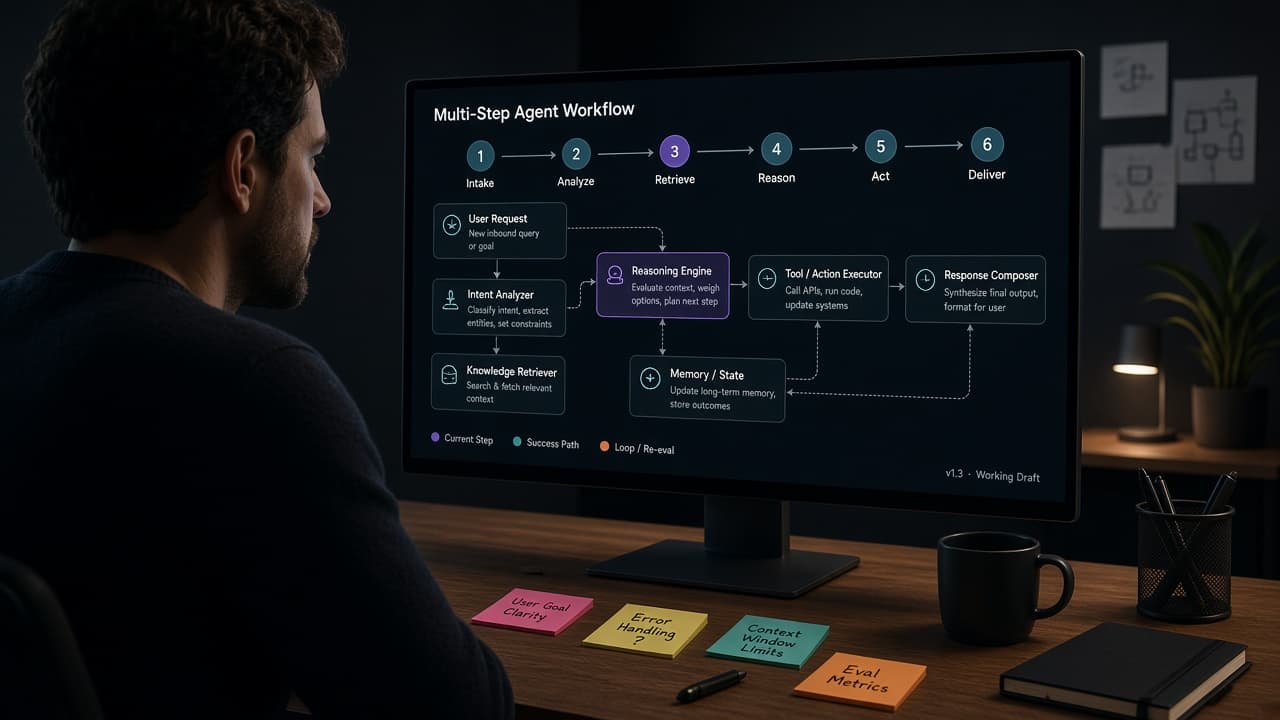
Agentic AI UX is the set of interface patterns that let people delegate multi-step work to systems that plan, call tools, and act. It is not the same as engineering “agentic design patterns” such as tool routing or multi-agent orchestration. Those matter for reliability. Users experience the layer above them: plan previews, autonomy dials, status, approvals, receipts, memory controls, and recovery.
A chatbot answers. An agent acts. That difference changes the design job. Chat can be wrong and still cheap to ignore. An agent that emails a customer or deletes a workspace is expensive when wrong. Agentic AI UX therefore prioritizes visibility and interruptibility over clever conversation.
Useful distinctions for your product brief:
Interface patterns (this post): plan preview, approval gates, undo, audit log, confidence affordances, progressive autonomy.
Architecture patterns (engineering): tool use, evaluator-optimizer loops, orchestrator-worker agents.
Prompt patterns: role prompts, constrained tool lists, verification checklists.
Do not ship a floating chat and call it agentic. If the model cannot show a plan, wait for approval on consequential steps, and leave an evidence trail, you have an assistant demo—not an agent product.
For SaaS MVPs, start with one narrow job: “draft and queue a dunning email,” “propose a sprint board from a brief,” “reconcile expenses against policy.” Complete that job with reviewable steps before you expand autonomy. Breadth without a trust model trains users to disable AI entirely.
Design the AI agent approval workflow first
An AI agent approval workflow is the core of human in the loop UX design for consequential actions. The workflow should answer five questions before anything irreversible happens.
What is the agent about to do? Show a plain-language plan with ordered steps, not a wall of tool JSON.
What evidence did it use? Link source records, timestamps, and excerpts.
What will change if I approve? Name objects, recipients, environments, and blast radius.
What happens if I reject or edit? Make revision the default path, not a buried overflow.
Who is allowed to approve? Role-based approval matters in B2B. A marketer may draft. A lead may send.
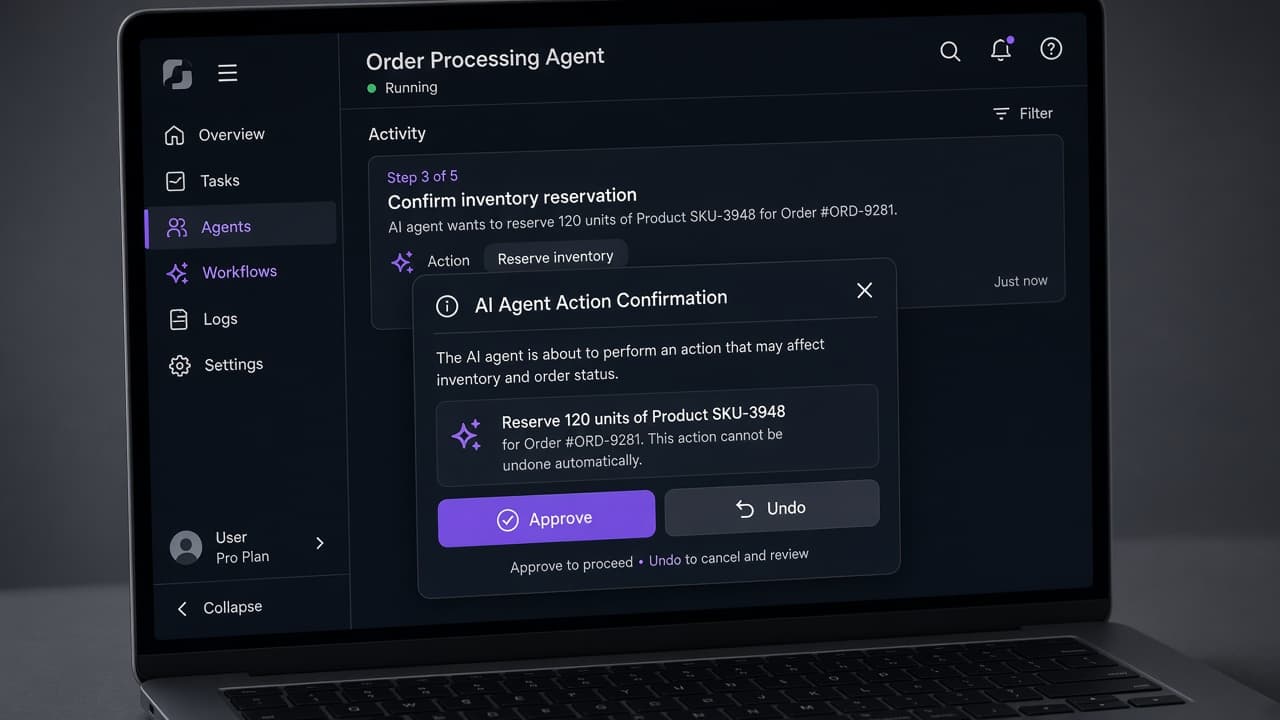
A practical approval card includes: intent summary, steps, evidence, risk level, primary Approve, secondary Edit plan, tertiary Cancel. For multi-step runs, require approval only at consequential boundaries—send, delete, publish, charge, change permissions—while allowing low-risk preparation steps to proceed with ambient visibility.
Anti-patterns to avoid: approve-all toggles buried in settings, auto-approve after one success with no time limit, and approvals that expire into silent execution. Progressive autonomy should be earned with explicit policy, not implied by inactivity.
Instrument the workflow. Track plan shown, edited, approved, rejected, and overridden after start. Those events teach you whether users trust the agent or fight it. If edit rates stay high, improve planning quality. If reject rates stay high on one step type, that step is not ready for semi-autonomy.
Founders often ask where the AI agent approval workflow should live: modal, side panel, or full page. Use modals for single irreversible actions. Use a persistent side panel for multi-step runs the user may supervise while working. Use a full-page review only for high-stakes batches—payroll exports, customer-wide campaigns—where scanning a table matters more than speed.
| Action type | Default gate | Required evidence | Undo expectation |
|---|---|---|---|
| Read / summarize | None (show sources) | Citations or record links | N/A |
| Draft in-product | Optional review | Diff or preview | Edit or discard draft |
| Write to workspace | Confirm on first run | Before/after preview | Revert version |
| External send / publish | Always approve | Recipient, content, timing | Recall if possible; else receipt |
| Delete / permissions / billing | Always approve + role check | Exact target list | Hard to undo—warn clearly |
Agentic AI design patterns for SaaS that actually ship
Teams shipping AI-native SaaS in 2026 converge on a small set of agentic AI design patterns for SaaS. You do not need sixteen patterns on day one. You need the subset that matches your risk profile.
Plan preview before act. The agent proposes a checklist the user can edit. Editing the plan is cheaper than cleaning up after a wrong path.
Ambient status over modal monopolies. Show running steps in a side panel or inline timeline while the user keeps their primary canvas. Chat-first takeovers break comparison and fine editing.
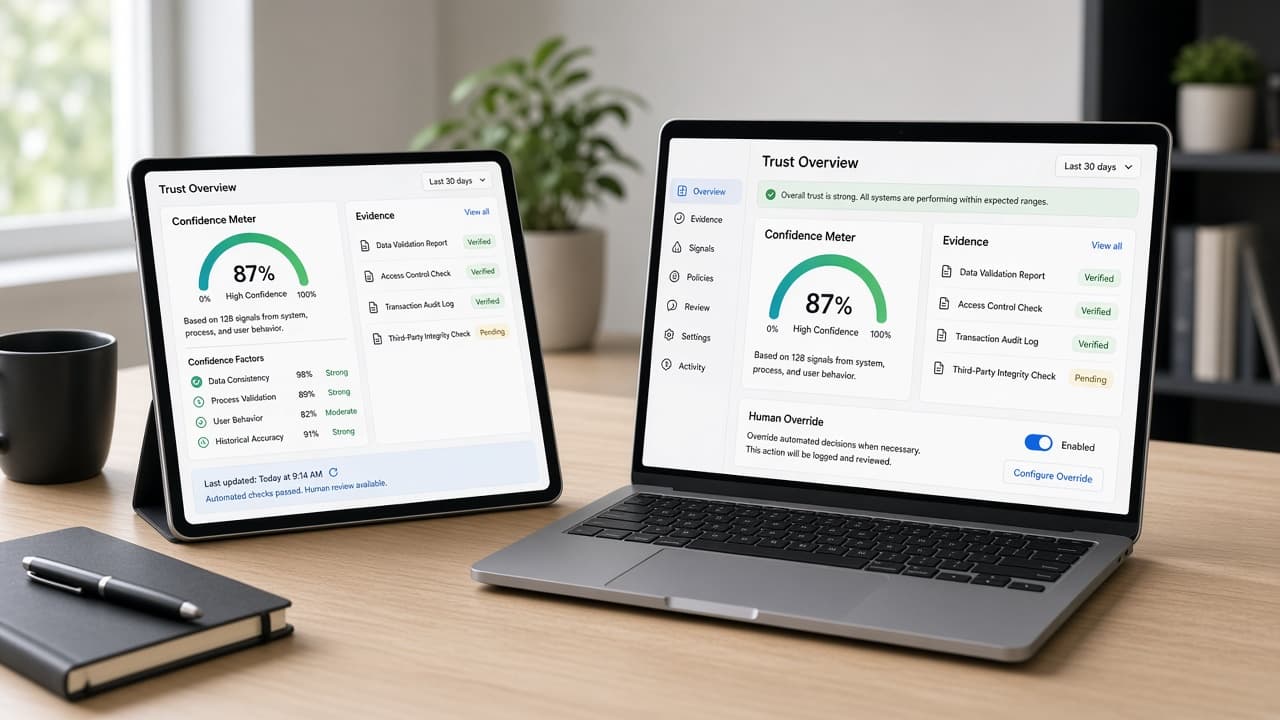
Confidence affordances. Separate facts found in the system, inferences, actions already taken, and actions waiting for approval. Fake certainty destroys trust faster than slow honesty.
Progressive autonomy dial. Start read-only or draft-only. Graduate to supervised writes. Only then allow limited auto-run for narrow, reversible jobs. Label the dial in product language: Suggest, Draft, Ask before acting, Act within policy.
Interrupt and handoff. At any moment the user should stop the agent without the system “catastrophizing.” If a password, payment, or ambiguous policy appears, the agent yields the screen and resumes after handoff.
Ephemeral personalization. Prefer session-scoped preferences over permanent silent customization that users cannot inspect. Memory should be visible and erasable.
These patterns play differently by domain. In analytics SaaS, agents should explain drops with linked charts. In fintech, they should draft and never move money without dual control. In HR tools, they should never message candidates until a human approves. Copy the pattern, not the autonomy level, from consumer demos.
If you already published an intent-based command palette, connect it to these agentic AI design patterns for SaaS. Intent captures the job. The agentic layer executes tools under policy. Keeping both layers distinct prevents the classic failure mode: a free-text box that can “do anything” and therefore cannot be trusted to do anything important.
AI agent undo and audit log UX: make work reviewable
Autonomy without recovery is a liability. AI agent undo and audit log UX turns agent behavior into something operators can defend in a customer call or a security review.
Undo is the minimum for reversible writes: restore the previous record version, unschedule the send, revert the board move. For irreversible actions, undo becomes “compensating action”—a follow-up message, a refund path, a rollback runbook—and the UI must say so before approval.
Receipts should appear after every consequential run: what ran, when, under whose approval, which tools fired, what changed, what failed. A receipt is not a chat transcript. It is an artifact you can link in Slack and attach to a ticket.
Audit logs need search by actor, agent, object, and time. Product and security teams will ask for this the moment you pitch enterprise. Design the log as a first-class surface, not a CSV export you promise later.
A strong review layout has three columns or stacked sections on mobile: Action proposed or taken, Evidence, Controls (undo, retry, escalate). Keep language concrete. “Updated 12 opportunities in HubSpot” beats “Completed CRM sync.”
Measure trust with behavior, not surveys alone. Time-to-approve, percent of runs edited before approval, undo rate within ten minutes, and disabled-agent rate by persona tell you whether your agentic AI UX is earning autonomy or exhausting patience.
Human in the loop UX design without slowing the product to zero
Human in the loop UX design is often misunderstood as “ask for confirmation on everything.” That design trains users to click Approve blindly. Good loops are selective, informative, and fast.
Batch low-risk decisions. If an agent proposes twenty tag updates with the same rule, approve the rule once with a sample, not twenty identical modals.
Pre-approve policies, not surprises. Let admins define allowed domains, spend caps, and environments. The agent operates inside the policy; exceptions escalate.
Async approvals for long jobs. When a run takes minutes, notify in-product and by email with deep links to the pending card. Do not hold a spinner hostage.
Dual control for high blast radius. Two approvers for production schema changes or customer-wide messaging is a feature, not bureaucracy, in B2B.
Keep the happy path short. The best agent experiences feel fast because preparation is automated and only the judgment step is human. If every run needs a meeting, you designed a workflow tool with extra latency—not an agent.
Tie this back to activation. New users should complete one supervised agent job in the first session: see a plan, approve a safe action, inspect a receipt. That is the aha moment for agentic products—more than a clever first chat reply.
Document the loop in your design system as reusable components: PlanPreview, ApprovalCard, AgentReceipt, AuditEventRow. When every AI feature invents its own confirmation UI, trust erodes through inconsistency. Shared patterns also speed engineering—the same way a button component does—while keeping human in the loop UX design coherent across the product.
Add one more paragraph of operational detail for SEO depth: pair every agent run with a short “why this recommendation” note written for a busy operator, not a researcher. If the agent cannot explain the recommendation in two sentences with linked evidence, it is not ready for an approval gate in a production SaaS workflow.
A one-sprint checklist for SaaS teams
Use this checklist to ship a trustworthy agent slice without boiling the ocean.
Day 1–2: Write the job story and non-goals. Name the one outcome. List verbs the agent may use. Explicitly forbid send, delete, publish, and billing changes unless approved.
Day 3: Prototype the plan preview and approval card in high fidelity. Include evidence slots even if the data is mocked.
Day 4: Define undo and receipt behavior with engineering. If undo is impossible, change the copy and the gate—do not hide the limitation.
Day 5: Instrument events. Plan viewed, edited, approved, rejected, undone. Add a simple eval set of ten golden tasks.
Day 6–7: Usability test with five target users. Watch where they hesitate. Fix language and gates before expanding tools.
Staffing note for founders hiring a product design partner: bring the job story and risk list to kickoff. A studio can design the agentic AI UX contract faster than it can reverse a rushed chatbot launch. At Mool Studio we would rather spend the first week on approvals and auditability than on decorative sparkle icons.
If you already shipped a chat widget, do not rip it out on day one. Wrap the highest-risk tools behind approvals, add receipts, and migrate users toward ambient, job-scoped agents. Trust compounds. Autonomy can wait until the receipts are boring.
Bottom line: earn autonomy with reviewable work
Agentic AI UX wins when users can delegate without gambling. Lead with an AI agent approval workflow, practice disciplined human in the loop UX design, ship agentic AI design patterns for SaaS that match your domain risk, and invest in AI agent undo and audit log UX so every consequential run is explainable.
The market is moving from chatbot novelty to agent capability. Products that treat trust as a UX requirement—not a policy PDF—will keep AI features turned on. Design the control surface first. Then let the agent move faster inside clear rails.
Sources and further reading: 2026 UX trend reports on AI copilots and intent-driven interfaces; agentic UX pattern libraries emphasizing plan previews, approvals, and recovery; search-demand analyses showing agentic language overtaking chatbot queries.
Related articles
11 min read
Design Systems for AI Features: Primitives, Review States, and Shipping Velocity
AI features ship faster when design systems define the review contract first—primitives, tokens, and states—not when every squad invents its own sparkle button.
11 min read
Answer Engine Optimization for SaaS: Get Your Product Cited in AI Answers
SEO still matters—but buyers now ask AI assistants first. AEO is how you get your SaaS cited in those answers with pages models can quote accurately.